CHARACTERISTICS OF COMPUTERS

The characteristics of computers that have made them so
powerful and universally useful are speed, accuracy,
diligence, versatility and storage capacity. Let us discuss them
briefly.

  1. Speed
    Computers work at an incredible speed. A powerful computer
    is capable of performing about 3-4 million simple instructions
    per second.
  2. Accuracy
    In addition to being fast, computers are also accurate. Errors
    that may occur can almost always be attributed to human
    error (inaccurate data, poorly designed system or faulty
    instructions/programs written by the programmer)
  3. Diligence
    Unlike human beings, computers are highly consistent. They
    do not suffer from human traits of boredom and tiredness
    resulting in lack of concentration. Computers, therefore, are
    better than human beings in performing voluminous and
    repetitive jobs.
  4. Versatility
    Computers are versatile machines and are capable of
    performing any task as long as it can be broken down into a
    series of logical steps. The presence of computers can be
    seen in almost every sphere – Railway/Air reservation, Banks,
    Hotels, Weather forecasting and many more.
  5. Storage Capacity
    Today’s computers can store large volumes of data. A piece
    of information once recorded (or stored) in the computer,
    can never be forgotten and can be retrieved almost
    instantaneously.
The bootstrap loader #BIOS#what is BIOS?#Basic Input Output System.

The bootstrap loader is a small but very important part of the OS which is permanently stored in ROM.

When the computer is first switched on the bootstrap loader starts to run.

It checks the RAM and input/output devices to make sure that they are working and then locates the OS on backing storage, usually on Hard disk but could be on CD or even a memory stick.

It then loads the OS into RAM and the OS takes over control.

Operating System #what is computer Operating System #what is OS

The operating system(OS) is the piece of software required by the computer to make sure that it works correctly and efficiently.

It manages the computer and allows the user to communicate with the hardware.

It manages the computer and allows the user to communicate with the hardware.

Storing the OS on disk means that it can be easily updated.  Windows Vista and XP are updated on a daily basis.

SHIFT REGISTER(PIPO)

 chapter 1: INTRODUCTION


In digital circuit, a shift register is a cascade of flip flops, sharing the same clock, in which the output of each flip-flop is connected to the ‘data’ input of the next flip-flop in the chain, resulting in a circuit that shifts bit by one position the ‘bit array’ stored in it, ‘shifting in’ the data present at its input and ‘shifting out’ the last bit in the array, at each transition of the clock input.

More generally, a shift register may be multidimensional, such that its ‘data in’ and stage outputs are themselves bit arrays: this is implemented simply by running several shift registers of the same bit-length in parallel.

Shift registers can have both parallel and serial inputs and outputs. These are often configured as ‘serial-in, parallel-out’ (SIPO) or as ‘parallel-in, serial-out’ (PISO). There are also types that have both serial and parallel input and types with serial and parallel output. There are also ‘bidirectional’ shift registers which allow shifting in both directions: L→R or R→L. The serial input and last output of a shift register can also be connected to create a ‘circular shift register’.

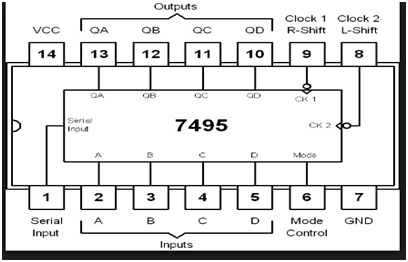
The final mode of operation is the Parallel-in to Parallel-out Shift Register. This type of shift register also acts as a temporary storage device or as a time delay device similar to the SISO configuration . The data is presented in a parallel format to the parallel input pins PA to PD and then transferred together directly to their respective output pins QA to QD by the same clock pulse. Mode Control input (one clock pulse )  loads and unloads the register.

Untitled

pin diagram of IC-7495